


Angie at your service 🌸 It feels a little weird to introduce myself here, but I’m a 20 y.o. cutie who loves to flirt. Sweet, gentle, and a little mischievous. Come on in — it’ll be cozy and steamy 😉


🌸 Naomi 🌸 I’m Arina 💗 Come and feel something — tension, curiosity, desire 🔞 I don’t chase attention. I attract it. I hope you want more than…


Hey, i’m Shikki Ko ✨ sweet, experienced, and i know my worth. i love attention — but even more, i love the game in looks and words. soft on the outside, but i always choose what i want. dm me if you’re ready for honesty, jokes, and a little flirt 💌
If you've ever tried finding someone on OnlyFans the same way you would on Instagram or TikTok, you probably already know how annoying it is. The platform gives you almost nothing for normal search. No full search bar where you can type a name and browse results. No filters by country, niche, or photo. No smart recommendations. In practice, there’s just a direct URL format and a system built more around creator promotion than actual discovery.
And that’s not some accident. OnlyFans is set up this way on purpose. The platform puts creator privacy and subscription revenue first, not open browsing. So if you want to do an OnlyFans search by name, whether it’s a username, a real name, or something broad like "Thai cosplay creator", you usually have to go around the platform, not through it.
The good news is that in 2026 there are at least seven methods that really work. In this guide, we’ll go through all of them, from the easiest one, using a dedicated catalog like our /models directory, to more advanced options like Google operators and reverse image search. By the end, you’ll understand exactly how to search for OnlyFans users, even if you don’t have the exact username.
Why Is OnlyFans Search So Limited?
OnlyFans made that choice from the start: creators should be the ones controlling how visible they are. The platform doesn’t index real names, doesn’t offer broad category browsing, and doesn’t let people search by photo. For many creators, that matters. It helps them keep some distance from coworkers, relatives, or anyone else they’d rather not have stumbling onto their page.
There’s also a business reason behind it. OnlyFans grows because creators bring in their own audience through Instagram, TikTok, Reddit, and Twitter. If the platform had a strong built-in discovery system, that whole promotion model would lose value. Instead of building an audience, creators would end up fighting an internal algorithm.
So what do we get as a result? Usernames work if you already know them. Real names and photos are basically useless inside the platform itself. Tags don’t really exist in the native interface. Search by location is missing completely.
That’s exactly why third-party catalogs, search tools, and directories became so useful. Our creator catalog at /models was built to solve that problem by collecting, tagging, and filtering profiles in ways OnlyFans itself simply doesn’t offer.
Method 1: Use Our OnlyFans Catalog - The Fastest Way
If you don’t know the exact username, this is the smartest place to start. Our catalog is the easiest answer to the question of how to find users on OnlyFans without guessing handles or endlessly digging through social media.
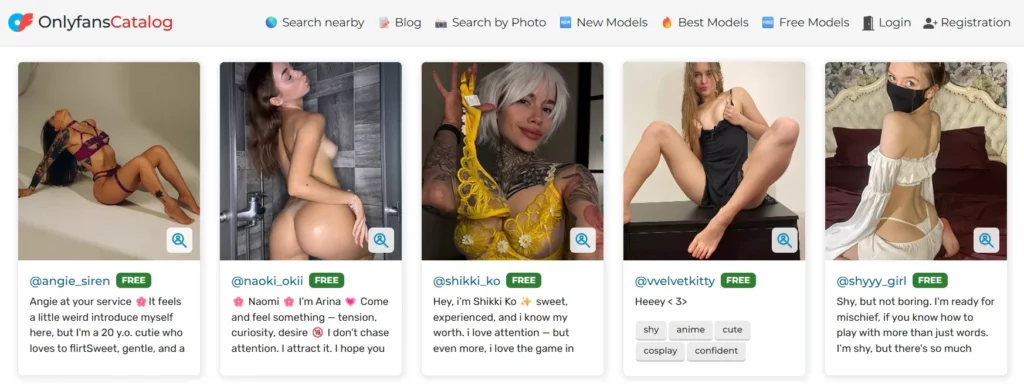
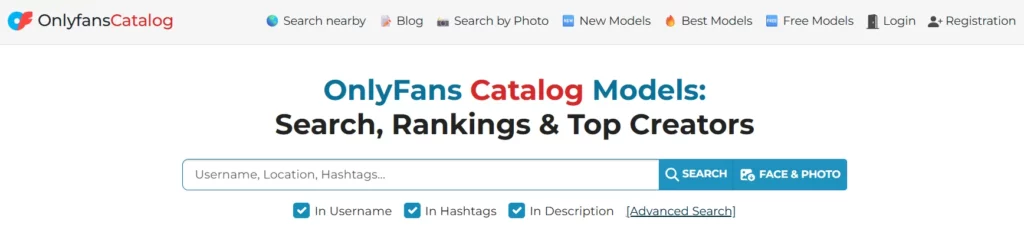
Step 1: Go to /models
Open the main catalog page. You’ll see a search bar and filters right away.
Step 2: Search by username
If you remember even part of a handle, type it in. The catalog can return close matches, verified profiles, and similar creators.
Step 3: Search by tags or niche
This is where the catalog becomes much more useful than the platform itself. You can enter keywords like redhead, femboy, thai, arab, cosplay, goth, or fitness and browse creators by niche. The results can be filtered and sorted.
Step 4: Use country filters
Want creators from a specific place? You can filter by Thailand, Malaysia, Romania, Colombia, and many other countries. Native OnlyFans doesn’t support this at all.
Step 5: Sort results
Use options like free, paid, new, and best to narrow down what you want. For example:
- Free femboy pages
- New Thai creators
- Top-rated redhead models
Step 6: Use photo search as a workaround
If you only have a photo, run it through Google Lens or TinEye first. If that helps you identify a handle or social profile, you can then check it in our catalog.
Pro tip: our catalog is updated regularly and includes verified profiles, so starting here usually saves a lot of time and avoids the mess you get with random outdated directories.
Method 2: Username Search - When You Already Have the Handle
If someone sent you a link or you remember the username, this is the most direct option.
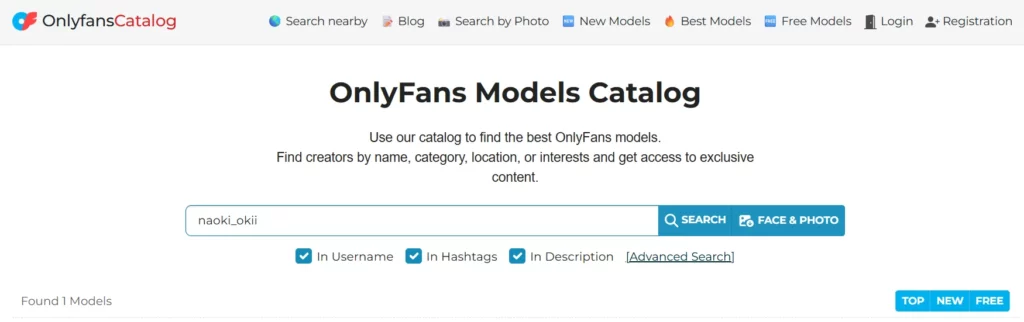
Direct URL method:
Go to onlyfans.com/@username and replace "username" with the handle you have. If the profile exists, it should open right away. If you see a 404 or a blank page, the account may have been deleted, renamed, or never existed.
Creator directories:
You can also type the username into our /models catalog to check whether the profile is active, see the subscription price, and preview basic details before subscribing.
Social media handle matching:
A lot of creators use the same username, or something very close to it, across different platforms. So if you found someone on Instagram or Twitter/X, try that same handle on OnlyFans. It works more often than people expect.
Google operator search:
Search for "@username" onlyfans on Google with quotes. That can surface Reddit threads, review pages, and social posts where that exact handle was mentioned.
Important: if the page exists but looks dead, no new posts, no updates for months, barely any activity, double-check the renewal terms before paying. Some profiles stay up even when the creator has clearly stopped using them.
Method 3: Real Name Search - Harder, But Possible
A lot of people ask how to find someone on OnlyFans by real name. It’s possible sometimes, but honestly, it’s one of the hardest methods because OnlyFans doesn’t index real names in any useful way.
Still, some creators choose to use their real name, or part of it, in their display name, bio, or social profiles. That gives you a few ways to track them down.
Google operators:
Try searching "[First Name Last Name]" onlyfans with quotes. You can also use site:onlyfans.com "[First Name]", although Google only indexes limited public parts of profiles.
Instagram and Twitter reverse lookup:
Search the person’s full name on Instagram. If they run a public creator account, the OnlyFans link is often right there in the bio. Twitter/X works similarly. You can search from:[twitterhandle] onlyfans to find tweets where they posted their link.
Reddit communities:
There are Reddit threads and communities where people discuss creators by name. Search for [name] onlyfans inside Reddit and you may find references, especially if the creator promotes publicly.
Our catalog as a backup:
Once you find a display name, handle, or even part of one, check it in the /models directory to get verified details.
Note: real-name search works best when the creator is already active on public platforms. If someone is intentionally keeping their identity separate, then this method may not lead anywhere, and that’s very likely by design.
Method 4: Photo Search - Reverse Image Cross-Reference
If you have no username and no name, but you do have a photo, reverse image search can be a good starting point.
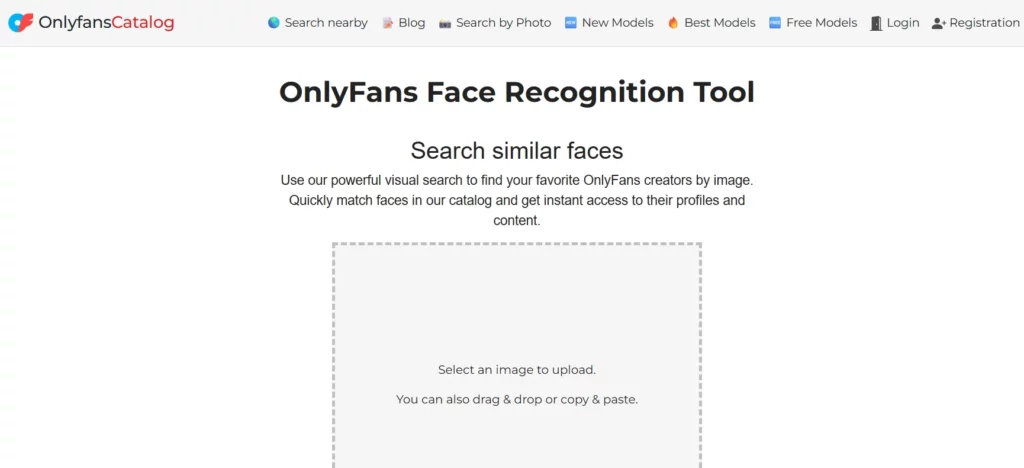
Step 1: Google Lens
Go to lens.google.com, upload the image, and look through the results. Google may show visually similar photos and pages where that image appears.
Step 2: TinEye
tineye.com is better when you want exact image matches. It’s usually more precise than Google Lens for identical images, though not as strong for broader visual similarity.
Step 3: Follow the social trail
If the photo leads you to Instagram or Twitter/X, check the bio or profile links. Many creators put their OnlyFans link there directly.
Step 4: Cross-check in the catalog
Once you think you found the right username, niche, or social identity, verify it through our /models catalog or search by matching tags like cosplay redhead or femboy gaming.
Limitation: this only works if the photo exists publicly somewhere. If the image only appeared behind a paywall on OnlyFans, it won’t be indexed, and reverse search won’t help.
Method 5: Tag and Niche Search - The Most Reliable Discovery Method
If you’re not looking for one exact person, but want creators in a certain niche, this is usually the most reliable method in 2026. It’s also one of the areas where our catalog is clearly better than native OnlyFans.
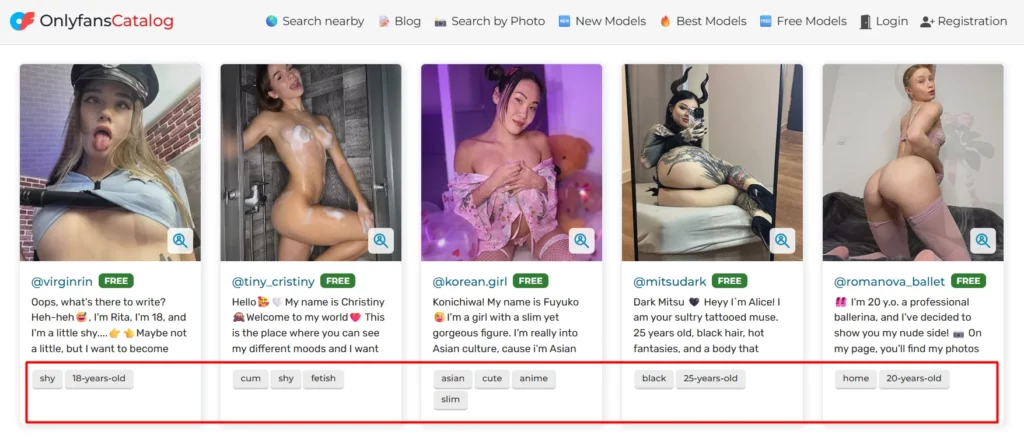
How to search OnlyFans users by niche in our catalog:
Popular tags currently include:
- femboy, twink, non-binary
- redhead, blonde, brunette, ebony
- thai, arab, hijab, latina, asian
- goth, e-girl, cosplay, fitness, yoga
- gaming, ASMR, alt, punk
Every tag page can be filtered by free or paid pages, then sorted by new arrivals or top-rated creators. Some examples:
- Free creators in Thailand
- New Malaysian creators
- Best Arab creators
Why do tags work so well? Because a good tag system is curated. That means less irrelevant noise than you’d usually get from Google, where unrelated pages can rank for the same words.
This method is especially useful when you’re not searching for one specific person and just want to explore a niche or discover new creators. In practice, tag browsing is the closest thing to real discovery that OnlyFans never built.
Method 6: Social Media Reverse Search
A huge part of OnlyFans promotion happens on social media, so this is often the natural place to look when you’re trying to find someone you already know from somewhere else.
Instagram:
Search the person’s name or known username. If it’s a creator account, the OnlyFans link is often in the bio. Some use Linktree or Beacons instead of a direct link, but you can usually find the destination in a click or two.
Twitter/X:
Twitter/X is still one of the biggest promotion channels for creators. Search from:[username] onlyfans to find posts where they shared their link. You can also search [name] onlyfans more broadly.
TikTok:
Creators often avoid saying "OnlyFans" directly on TikTok, so they use softer wording like "exclusive content" or shorthand terms. But the bio link often leads to the right place.
Once you’ve found the likely handle, check it in our /models catalog so you can confirm the profile and see pricing details before subscribing.
Method 7: Google Search Operators - Advanced Technique
If you’re comfortable with search syntax, Google operators can dig up results that a normal search misses.
By username:
site:onlyfans-catalog.com "@username"
By real name:
"First Last" onlyfans -inurl:reddit
That -inurl:reddit part is useful if you want fewer Reddit results and more direct profile mentions or review pages.
By niche:
or
By tag and geo:
Google indexes a fair amount of public OnlyFans profile data, including display names, bios, and post previews. So with the right operators, you can combine terms in ways that OnlyFans itself simply doesn’t allow.
That said, if you want the same kind of results without messing with search syntax, the /models catalog is the easier route.
Quick Comparison: Which Method Works Best?
| Method | Speed | Accuracy | Needs Exact Data |
| Our Catalog | ⭐⭐⭐⭐⭐ | ⭐⭐⭐⭐⭐ | No |
| Username (direct URL) | ⭐⭐⭐⭐⭐ | ⭐⭐⭐⭐⭐ | Yes - exact handle |
| Real Name | ⭐⭐⭐ | ⭐⭐⭐ | Sometimes |
| Photo (reverse image) | ⭐⭐ | ⭐⭐⭐ | Photo required |
| Tags / Niche | ⭐⭐⭐⭐ | ⭐⭐⭐⭐ | Niche known |
| Social Media Reverse | ⭐⭐⭐ | ⭐⭐⭐⭐ | Social profile needed |
| Google Operators | ⭐⭐⭐ | ⭐⭐⭐ | Some syntax knowledge |
Common Mistakes and How to Avoid Them
Even if you use the right methods, there are a few mistakes people make all the time.
1. Expecting OnlyFans to work like Google
It doesn’t. The platform was never really built for broad search or discovery. If you treat it like a normal search engine, you’ll just waste time.
2. Trusting random third-party directories
Some directories are outdated, some are messy, and some list fake or abandoned profiles. It’s better to stick with verified catalogs and cross-check what you find.
3. Forgetting the difference between free and paid pages
A lot of creators run both. One page might be free and mainly used to attract followers, while the paid one holds the premium content. Make sure you know which one you’re looking at. A good starting point is free pages.
4. Not checking renewal terms
Some subscriptions auto-renew, and introductory discounts don’t always stay that way. Always look at what you’re actually agreeing to before subscribing.
5. Sending generic first messages
If you decide to message a creator, a bland opener usually goes nowhere. Specific, natural messages are much more likely to get a response.
Step-by-Step: Your First 30 Minutes of Search
If you want a simple workflow, here’s the cleanest way to do it:
- Go to /models and start with the catalog.
- If you know even part of a username, search that first.
- If that doesn’t work, switch to tags and browse by niche.
- If you find a possible match, verify through Instagram or Twitter.
- Check the page itself: post count, recent activity, pricing, and overall signs that it’s active.
- Before subscribing, look at renewal terms and start with a free page if one exists.
How We Make Creator Search Easier
Our catalog was built specifically to fill the discovery gap that OnlyFans leaves open. Instead of relying on scattered directories and search tricks, you get a more structured way to find profiles.
Here’s what makes it useful:
- Centralized database - thousands of verified profiles in one place
- Tag and niche filtering - browse by style, content type, body type, or background
- Geo-based search - filter by country or region
- Free / paid / new / best sorting - get to relevant results faster
- Verified profiles - less risk of landing on abandoned or fake pages
- Regular updates - new creators added consistently
Angie at your service 🌸 It feels a little weird to introduce myself here, but I'm a 20 y.o. cutie who loves to flirt. Sweet, gentle, and a little mischievous. Come on in — it'll be cozy and steamy 😉
🌸 Naomi 🌸 I'm Arina 💗 Come and feel something — tension, curiosity, desire 🔞 I don't chase attention. I attract it. I hope you want more than...
Hey, i’m Shikki Ko ✨ sweet, experienced, and i know my worth. i love attention — but even more, i love the game in looks and words. soft on the outside, but i always choose what i want. dm me if you’re ready for honesty, jokes, and a little flirt 💌
So whether you’re doing an OnlyFans search by name, browsing a niche, or trying to identify someone you found on social media, our catalog at /models is one of the most practical tools available in 2026. You can also check the /best section for curated top-rated profiles across major categories.
FAQ: OnlyFans Search Questions
Can you search for people on OnlyFans?
OnlyFans has a very limited native search system. If you already know a username, you can try entering it directly as onlyfans.com/@username, but you can’t properly search by real name, niche, or location inside the platform. For that kind of search, third-party directories like our /models catalog are much more useful.
How do you find someone on OnlyFans by username?
The simplest way is to go to onlyfans.com/@username and replace the last part with the actual handle. You can also enter that username into our catalog search to check whether the page is active, see pricing, and review basic details before subscribing. If the direct URL doesn’t work, the account may have been renamed or removed.
How to find someone on OnlyFans by real name?
OnlyFans itself doesn’t really support this, so you’ll need to search from the outside. Try Google with "First Last" onlyfans, check Instagram or Twitter for the person’s public profile, or search Reddit communities where creators are discussed. Once you find a display name or partial handle, verify it in our catalog. It’s doable, but it usually takes a few extra steps.
How to search OnlyFans users by tags?
Our catalog supports full tag-based browsing. Open /models and search by any niche keyword, or go straight to pages like /models/femboy or /models/redhead. You can combine tags with country filters and sorting options like popularity, newness, or free versus paid. This is one of the best ways to discover creators without knowing a username.
Is there a way to search OnlyFans by photo?
Not directly inside OnlyFans. But you can use Google Lens or TinEye to reverse-search an image. If that image appears somewhere public, you may find social profiles connected to it. From there, you can follow the link to OnlyFans or search the username in our catalog. This works best with public images, not paywalled content.
Why can't I search OnlyFans like Google?
Because the platform intentionally doesn’t work that way. It limits broad discovery to protect creator privacy and to keep traffic generation in the hands of creators themselves. That’s why tools like our creator catalog exist in the first place - they cover the discovery side that OnlyFans leaves out.
What are the best OnlyFans search directories?
The most commonly mentioned options in 2026 include our catalog at /models, OnlyFinder, and FansMetrics. Out of those, our catalog stands out because it combines tags, geo filters, and pricing filters in one place and gets regular updates. No matter what directory you use, it’s still smart to verify the final result on the actual OnlyFans profile.
Do free OnlyFans pages show up in search?
Yes, free pages can be found just like paid ones. In our catalog, you can filter specifically for free subscriptions, which is useful if you want to check out a creator before paying for premium content. Browse current free creator listings here.
How do I verify a creator is real?
A few easy signs help: recent posting activity, matching identity across social media, normal engagement, and presence in a verified directory. Our catalog marks verified profiles separately. If a page has very few posts, no outside presence, and barely any activity, it’s smarter to be cautious before subscribing.
Can I search OnlyFans by country or niche?
Not inside the native platform. But yes, you can do that in our catalog. /models supports filters by country, region, and niche at the same time. So if you want creators from a specific area and within a certain category, that’s one of the easiest ways to narrow things down.